How to Find an End City in Minecraft Fast becomes easier when you know where End Cities generate and how to reach the outer islands. Instead of wandering randomly, use routes, coordinates, commands, or an End City Finder to reduce exploration.
This guide covers survival methods, End Gateways, the locate command, seed-based searching, End Ships, Elytra, and mistakes. It explains how to use an End City Finder with manual exploration so you can choose the quickest method for your world.
Where Do End Cities Generate in Minecraft?
End Cities generate in the outer islands of the End dimension. They do not normally appear around the central island where you fight the Ender Dragon.
After defeating the Ender Dragon, an End Gateway appears around the main island. The gateway gives you an efficient route to the outer End islands, which is where your End City search should begin. Mojang confirms that defeating the dragon creates an End Gateway that provides access to these outer islands.
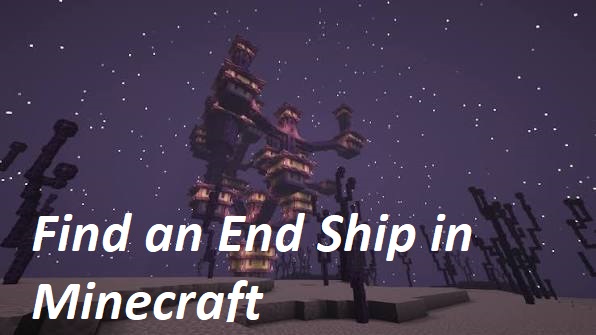
End Cities are easy to recognize once they appear in view because they are large purple structures built from purpur blocks, End stone bricks, towers, bridges, and rooms.
Some End Cities also generate with an End Ship, which is particularly valuable because it can contain an Elytra.
What Is the Fastest Way to Find an End City?
The fastest method depends on how you want to play.
| Method | Speed | Cheats Needed | Best For |
|---|---|---|---|
| End City Finder | Very Fast | No in-game cheats | Seed-based searching |
/locate command | Very Fast | Yes | Creative or cheats-enabled worlds |
| Elytra exploration | Fast | No | Experienced End explorers |
| Manual exploration | Moderate | No | Traditional Survival players |
If you know your world seed, an End City Finder is one of the easiest ways to reduce unnecessary exploration.
If cheats are enabled, the /locate command can provide coordinates almost instantly.
For completely traditional Survival gameplay, you will need to travel through an End Gateway and search the outer islands manually.
How to Find an End City in Survival Mode
Finding an End City naturally takes more effort, but a planned approach can save a significant amount of time.
Step 1: Reach the End
First, locate a stronghold and activate the End Portal using Eyes of Ender.
Enter the portal and prepare to fight the Ender Dragon.
Bring reliable armor, weapons, food, blocks, and other supplies because the journey does not end after the dragon fight.
Step 2: Defeat the Ender Dragon
Defeating the Ender Dragon creates an End Gateway around the edge of the main End island.
The gateway is important because it provides convenient access to the outer End islands.
Technically, experienced players can reach the outer islands without defeating the dragon by traveling across the enormous gap, but using the gateway is far safer and more practical.
Step 3: Prepare for Outer End Exploration
Do not enter the outer End without supplies.
Useful items include:
- Ender Pearls
- Building blocks
- Strong armor
- Food
- Weapons
- Ender Chest
- Water bucket
- Potions
- Feather Falling boots
- Pickaxe
- Extra inventory space
Mojang specifically recommends items such as Ender Pearls, blocks, good equipment, food, an Ender Chest, and water when exploring for End Cities.
An Ender Chest is especially useful because you can store valuable loot before taking further risks.
Step 4: Enter the End Gateway
End Gateways are small bedrock structures containing a portal block in the center.
The opening is too small to walk through normally.
One of the easiest ways to enter is to throw an Ender Pearl into the gateway. Mojang’s official End City guidance recommends this method for reaching the outer islands.
Once transported, you will arrive somewhere in the outer End.
Step 5: Save Your Gateway Coordinates
Before exploring, record your coordinates.
This is one of the simplest but most important End City exploration tips.
Save the X and Z coordinates of your gateway by:
- taking a screenshot;
- writing them down;
- placing a recognizable marker;
- saving them in a note.
Without coordinates, finding your return gateway can become difficult after traveling across several islands.
Step 6: Choose One Main Direction
Do not wander randomly.
Pick a general direction and continue moving through the outer islands.
For example, if you begin traveling east, continue increasing your X coordinate instead of repeatedly changing direction.
This makes it easier to identify unexplored terrain and prevents you from accidentally circling the same islands.
Step 7: Search Larger Islands First
Small floating islands are usually poor places to spend large amounts of exploration time.
Prioritize substantial outer islands where you can travel farther and scan more terrain.
Move to elevated areas whenever possible and look across the horizon before crossing another void gap.
End Cities are tall enough that their purpur towers can often be noticed from a considerable distance when terrain and render distance allow it.
Step 8: Look for Purple Towers
The easiest visual clue is the city’s purple architecture.
Watch for:
- Tall purpur towers
- End stone brick structures
- Bridges between towers
- End rods
- Multi-level rooms
- Floating End Ships
Once you see a purple structure rising from the End terrain, move toward it carefully.
Use an End City Finder to Locate Cities Faster
An End City Finder is useful when you want to avoid spending a long time exploring random islands.
A seed-based finder can use your Minecraft world seed to help identify possible End City locations and coordinates.
Instead of searching every island manually, you can use the coordinates as destinations and travel toward them inside your world.
For this website, the main tool page should be your primary End City Finder resource.
A typical process is:
- Find your Minecraft world seed.
- Open the End City Finder.
- Enter the correct seed.
- Select the appropriate Minecraft edition or version if required.
- Check the generated End City locations.
- Note the coordinates.
- Enter the End.
- Travel toward the selected coordinates.
This method is particularly useful if you want faster results without enabling in-game commands.
Why Use an End City Finder?
Manual End exploration involves large void gaps and widely separated islands.
An End City Finder can make exploration more focused because you have a destination instead of relying entirely on visual searching.
It is especially useful when:
- your first End Gateway leads to an empty area;
- you have searched several islands without success;
- you need another End City;
- you want to find potential End Ships;
- you are planning a long Elytra expedition;
- you want to reduce unnecessary bridging.
How to Find an End City With Commands
If cheats are enabled, the locate command is usually the fastest in-game method.
Use:
/locate structure minecraft:end_city
Microsoft’s current Bedrock command documentation lists minecraft:end_city as a valid structure and confirms that /locate structure finds the nearest specified structure in the current dimension. The command requires appropriate permissions and cheats.
Run the command while you are in the End dimension.
Minecraft will return coordinates for the nearest matching End City.
Java Edition
On modern Java Edition versions, the namespaced structure ID is:
minecraft:end_city
The command is generally:
/locate structure minecraft:end_city
Bedrock Edition
Current Bedrock documentation also recognizes:
minecraft:end_city
as an End City structure value.
If your version shows autocomplete options, use them because command syntax can vary between older releases.
Can You Teleport Directly to an End City?
Yes, if cheats are enabled.
After finding the coordinates with /locate, you can use /teleport or /tp.
However, you should not blindly teleport to an unsafe Y coordinate.
The End contains enormous void areas, and an incorrect teleport location can put your character in danger.
A safer approach is to use the X and Z coordinates as navigation targets and travel toward the structure.
How to Find an End City Without Cheats
If you prefer legitimate Survival exploration, you have two main choices:
Manual exploration keeps everything inside Minecraft.
An End City Finder can provide navigation assistance without activating in-game cheats.
Players differ on whether external seed tools count as cheating, so the decision depends on your personal playstyle or multiplayer server rules.
For a completely traditional experience:
- Defeat the Ender Dragon.
- Enter an End Gateway.
- Save its coordinates.
- Choose one direction.
- Search larger outer islands.
- Scan for purpur structures.
- Continue until you find a city.
Best Strategy for Finding End Cities Faster Manually
Random movement is one of the biggest reasons End City searches become slow.
Use a consistent exploration strategy instead.
Keep Moving in One Direction
Coordinates tell you whether you are making real progress.
If you keep moving primarily along one axis, it becomes much easier to avoid old terrain.
Climb Before Crossing
When you reach high terrain, stop and scan nearby islands.
Building another long bridge may be unnecessary if you can already see that the destination island contains nothing interesting.
Increase Render Distance When Practical
A higher render distance can help you notice distant structures sooner.
However, do not increase it beyond what your device can handle comfortably.
Smooth gameplay is more important than maximum visibility.
Carry Plenty of Blocks
Running out of building materials can end your exploration trip early.
Bring more blocks than you think you will need.
Use Ender Pearls Carefully
Ender Pearls can save time when crossing smaller gaps.
Mojang’s official guidance specifically recommends using bridges or Ender Pearls while traveling between outer islands.
Do not throw pearls blindly toward terrain you cannot clearly see.
How to Find an End Ship
An End City does not automatically mean you have found an End Ship.
Look around the upper sections of the city for a floating ship positioned away from one of the towers.
It has a distinctive shape and normally appears connected visually to the city by nearby bridges or towers.
If your first End City does not have one, keep searching for another city.
Why Are End Ships Important?
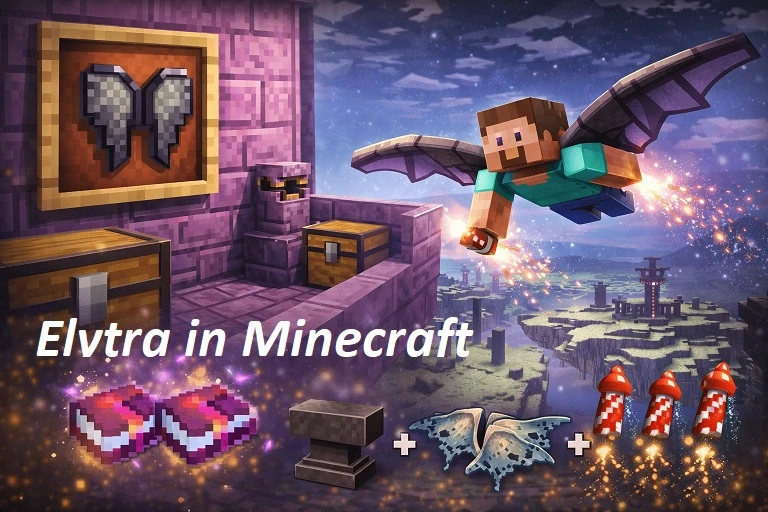
The main reason many players search End Cities is the Elytra.
Mojang confirms that Elytra can be found aboard End Ships.
End Ships can also contain additional loot and a dragon head at the bow.
Once you obtain an Elytra, future End exploration becomes dramatically easier because you can cover large gaps between islands much faster.
How to Get Elytra From an End Ship
Reach the End Ship carefully using:
- bridges;
- Ender Pearls;
- Elytra if you already own one.
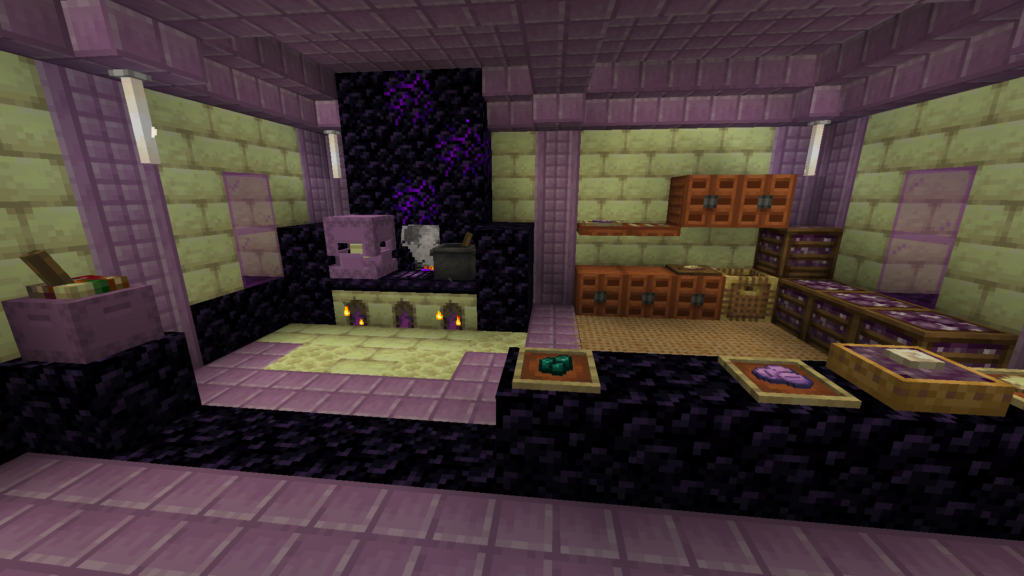
Once inside, watch for Shulkers.
The Elytra is found inside the ship in an item frame.
Mojang notes that End Cities contain Shulkers and that End Ships are the source of Elytra.
Store the Elytra somewhere safe as soon as possible.
If you brought an Ender Chest, placing valuable loot inside it can protect your progress if you later die.
How to Deal With Shulkers in an End City
Shulkers are one of the main dangers inside End Cities.
They fire homing projectiles that can apply the Levitation effect, causing you to rise into the air. When the effect ends, the resulting fall can cause serious damage or death.
Useful precautions include:
- Feather Falling boots
- Shield
- Good armor
- Food
- Water bucket
- Staying below ceilings
- Avoiding exposed edges
Fight patiently rather than rushing through multiple rooms.
Common Mistakes When Searching for an End City
Exploring Without Coordinates
This makes it easy to travel in circles.
Record your gateway coordinates and keep track of your direction.
Searching Only Tiny Islands
Large islands give you better visibility and more useful exploration routes.
Do not spend too much time crossing every small piece of End terrain.
Bringing Too Few Blocks
Outer End islands are separated by void gaps.
Without enough blocks or Ender Pearls, your search can stop prematurely.
Assuming Every City Has an End Ship
Finding an End City does not guarantee that you have found an Elytra.
Continue exploring if the city has no ship.
Forgetting Your Return Route
You can travel surprisingly far while searching.
Save the End Gateway coordinates before leaving your arrival area.
Entering an End City Unprepared
Finding the structure does not make you safe.
Shulkers can quickly turn a successful search into a dangerous fight.
End City Finder vs Locate Command vs Manual Search
Each method serves a different type of player.
| Feature | End City Finder | Locate Command | Manual Search |
| Requires seed | Usually | No | No |
| Requires cheats | No | Yes | No |
| Gives coordinates | Yes | Yes | No |
| Exploration required | Some | Minimal | High |
| Traditional Survival feel | Partial | Low | Full |
| Best for fast searching | Excellent | Excellent | Moderate |
For many players, an End City Finder offers a useful middle ground.
You still travel through your own Minecraft world normally, but you avoid completely random searching.
What Should You Bring Before Searching?
A simple End City checklist can prevent unnecessary trips.
Consider carrying:
- Diamond or Netherite armor
- Sword or axe
- Bow
- Pickaxe
- Ender Pearls
- Several stacks of blocks
- Food
- Water bucket
- Ender Chest
- Feather Falling boots
- Potions
- Extra tools
If you expect to explore several cities, leave some inventory slots empty for loot.
What to Do After Finding an End City
Once you reach the city, decide what your actual goal is.
If you want Elytra, immediately check whether an End Ship is present.
If you want Shulker Boxes, focus on fighting Shulkers and collecting shells.
If you want loot, explore the city’s rooms carefully and secure valuable items before continuing.
After obtaining your first Elytra, future searches become easier because you can move between outer islands by air.
FAQs
How Rare Is an End City in Minecraft?
End Cities can require considerable exploration because they generate across the outer End islands rather than around the main dragon island. The distance to the nearest city varies from world to world.
What Is the Fastest Way to Find an End City?
With cheats enabled, the /locate structure minecraft:end_city command is generally the fastest method. Without cheats, an End City Finder can reduce manual searching by providing useful coordinates.
Can You Find an End City Without Defeating the Ender Dragon?
The outer End islands exist before the dragon is defeated, so reaching them is technically possible. However, defeating the dragon creates an End Gateway, making access much easier.
Where Do End Cities Spawn?
They generate in the outer areas of the End dimension. Use an End Gateway after the dragon fight to reach those islands efficiently.
What Is the Command to Find an End City?
Use:
/locate structure minecraft:end_city
Current Microsoft Bedrock documentation lists minecraft:end_city as a supported structure value.
Does Every End City Have an Elytra?
No. Elytra is found on an End Ship, and not every End City includes a ship.
Can an End City Finder Work Without Cheats?
A seed-based End City Finder works outside normal Minecraft commands, so it does not require you to enable in-game cheats. You still need accurate world information for reliable results.
Why Can’t I Find an End City?
You may be searching too close to the central island, repeatedly exploring the same terrain, spending too much time on small islands, or simply be far from the next generated city.
What Should I Do If an End City Has No Ship?
Continue searching the outer islands for another End City. A city without an End Ship will not provide the Elytra you are looking for.
Is an End City Finder Better Than Manual Searching?
It depends on your playstyle. An End City Finder is faster and more targeted, while manual exploration provides a completely traditional Survival experience.
Conclusion
Learning How to Find an End City in Minecraft Fast is mainly about avoiding random exploration. Reach the outer End islands, save your coordinates, search in a consistent direction, and use an End City Finder when you want a faster seed-based route.
Commands provide the quickest option when cheats are enabled, while manual exploration preserves the full Survival experience. Once you find an End Ship and secure an Elytra, locating additional End Cities becomes much easier.